
DGX Station GB300: how vLLM settings changed the results of five large models
A benchmark result describes a model running with a specific configuration, not the model on its own. I ran the same five large mixture-of-experts models twice on the DGX Station GB300, on September 17 and 18, with a few vLLM settings changed between the runs. This article compares the two runs: where the results stayed the same, where they changed, and how large the changes were compared with the normal variation between repeated measurements.
How I measured
I used aiperf_tool, a small harness I built around NVIDIA’s AIPerf benchmark client and the vLLM inference server. Each model runs in its own vLLM container, and the benchmark sends requests of the same size: a 1,024-token prompt (slightly more once wrapped in each model’s chat template) and exactly 512 output tokens. The model is not allowed to stop early, so every request does the same amount of work. Each load level runs for five minutes and was measured twice in each run.
The load is given as concurrent requests. Each concurrent request is a slot that sends its next request the moment the previous answer is complete, without the pauses a person makes to read and type.
The benchmark measures speed: total tokens per second, how fast each individual answer streams, and the time to first token. It doesn’t measure answer quality, and it was run without speculative decoding.
| Run 1 | Run 2 | |
|---|---|---|
| System | NVIDIA DGX Station GB300 | same |
| Models | 5 large MoE models | same |
| Concurrent requests | 1, 4, 16, 32 (MiniMax-M2.7: also 64) | 1, 4, 16, 32, 64, 128 |
| Repeats per load level | 2 | 2 |
Requests processed in parallel (--max-num-seqs) | up to 64 | up to 128 |
| Data | aiperf_dgx_station_260918 | aiperf_dgx_station_260919 |
What changed between the runs
| Model | Run 1 | Run 2 |
|---|---|---|
| MiniMaxAI/MiniMax-M2.7 | 64 parallel requests, 25 GB in CPU memory | 128 parallel requests, otherwise unchanged |
| RedHatAI/GLM-5.3-Flash-NVFP4 | 64 parallel requests, no CPU offload | 128 parallel requests, otherwise unchanged |
| nvidia/NVIDIA-Nemotron-3-Ultra-550B-A55B-NVFP4 | 64 parallel requests, 150 GB of expert weights in CPU memory | 128 parallel requests, otherwise unchanged |
| nvidia/DeepSeek-V4-Flash-nvfp4-DSpark | 64 parallel requests, no CPU offload | 128 parallel requests, 15 GB of expert weights in CPU memory, tool-call parsing enabled |
| zai-org/GLM-5.3-Flash (BF16) | 64 parallel requests, 110 GB in CPU memory | 128 parallel requests, 130 GB in CPU memory |
Two of these settings need a short explanation.
--max-num-seqs is the maximum number of requests vLLM processes at the same time; further requests wait in a queue. vLLM reserves working memory for that maximum when it starts, so a higher value leaves less memory for other uses. In run 1, I set it to 64, the highest load level planned for any of these models. For run 2, I raised it to 128 to match the new highest load level.
--cpu-offload-gb moves a fixed amount of a model’s weights from GPU memory to the Grace CPU’s memory. vLLM moves the configured amount regardless of how much GPU memory is free, and the moved weights cross the CPU–GPU link for every generated token. With --cpu-offload-params experts, only expert weights are moved, of which each token uses a few.
The exact configuration files of both runs are in each repository’s conf/ folder.
Results at the same concurrency
Both runs share the load levels 1, 4, 16 and 32 (MiniMax-M2.7 also 64). Total throughput in tokens per second, run 1 → run 2:
| Model | 1 | 4 | 16 | 32 | 64 |
|---|---|---|---|---|---|
| MiniMaxAI/MiniMax-M2.7 | 105 → 107 | 221 → 224 | 392 → 400 | 542 → 554 | 814 → 821 |
| RedHatAI/GLM-5.3-Flash-NVFP4 | 132 → 132 | 408 → 410 | 1,017 → 1,019 | 1,507 → 1,506 | |
| nvidia/NVIDIA-Nemotron-3-Ultra-550B-A55B-NVFP4 | 30 → 30 | 50 → 50 | 74 → 74 | 99 → 99 | |
| nvidia/DeepSeek-V4-Flash-nvfp4-DSpark | 159 → 138 | 485 → 338 | 1,064 → 646 | 1,708 → 714 | |
| zai-org/GLM-5.3-Flash (BF16) | 30 → 27 | 69 → 61 | 126 → 99 | 149 → 149 |
For zai-org/GLM-5.3-Flash, the totals at 16 (run 2) and 32 (run 1) are affected by AIPerf’s measurement window; per request, run 2 was slower at every level.
For the three models where only the number of parallel requests changed, the results at the same concurrency matched within about 2 %. At these load levels, the higher limit made no difference, which is consistent with the limit only coming into play above 64.
zai-org/GLM-5.3-Flash, with 20 GB more of its weights in CPU memory in run 2, delivered 10 to 12 % fewer tokens per second to each request at every load level both runs had in common (1 to 32). The two repeats within each run differed by at most 0.05 tokens per second per request, so the difference between the runs is well beyond the normal variation.
nvidia/DeepSeek-V4-Flash-nvfp4-DSpark produced 13 to 58 % less in total in run 2. This model also varied more between repeats than any other in the test: at 32 concurrent requests, the two repeats produced 1,398 and 2,019 tokens per second in run 1, and 600 and 828 in run 2. Even so, at every shared load level, the higher repeat of run 2 was below the lower repeat of run 1. In run 2, this model had 15 GB of expert weights in CPU memory and tool-call parsing enabled; the measurements don’t separate the two changes.
Results at the new load levels
Run 2 extended the test to 128 concurrent requests, and four of the five models reached their highest total throughput there:
| Model | Peak in run 1 (at) | Peak in run 2 (at) |
|---|---|---|
| RedHatAI/GLM-5.3-Flash-NVFP4 | 1,507 (32) | 3,045 (128) |
| nvidia/DeepSeek-V4-Flash-nvfp4-DSpark | 1,708 (32) | 2,088 (128) |
| MiniMaxAI/MiniMax-M2.7 | 814 (64) | 1,263 (128) |
| nvidia/NVIDIA-Nemotron-3-Ultra-550B-A55B-NVFP4 | 99 (32) | 192 (128) |
| zai-org/GLM-5.3-Flash (BF16) | 149 (32) | 214 (64) |
For zai-org/GLM-5.3-Flash, vLLM’s own token counter shows 307 tokens per second at 128, above the 212 at 64; at 128, a single request took about three and a half minutes, and AIPerf counts only requests that complete within its measurement window.
These peaks aren’t directly comparable, because run 1 stopped at 32 (MiniMax: 64) concurrent requests. The higher peaks in run 2 come from the higher load levels. GLM-5.3-Flash-NVFP4 shows this most clearly: at 32 concurrent requests, both runs produced about 1,507 tokens per second, and at 128 in run 2, twice that.
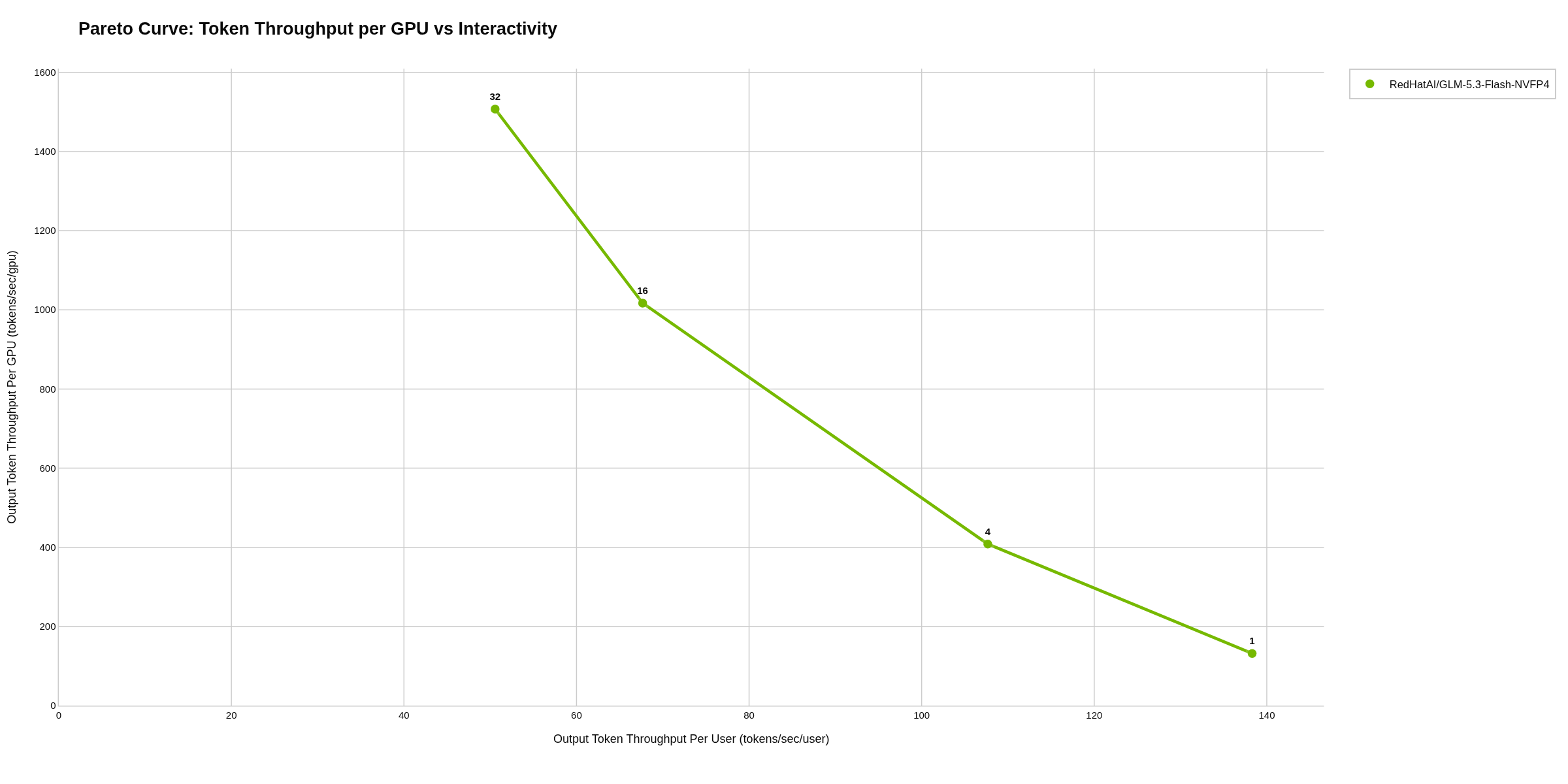
RedHatAI/GLM-5.3-Flash-NVFP4, run 1: up to 32 concurrent requests.
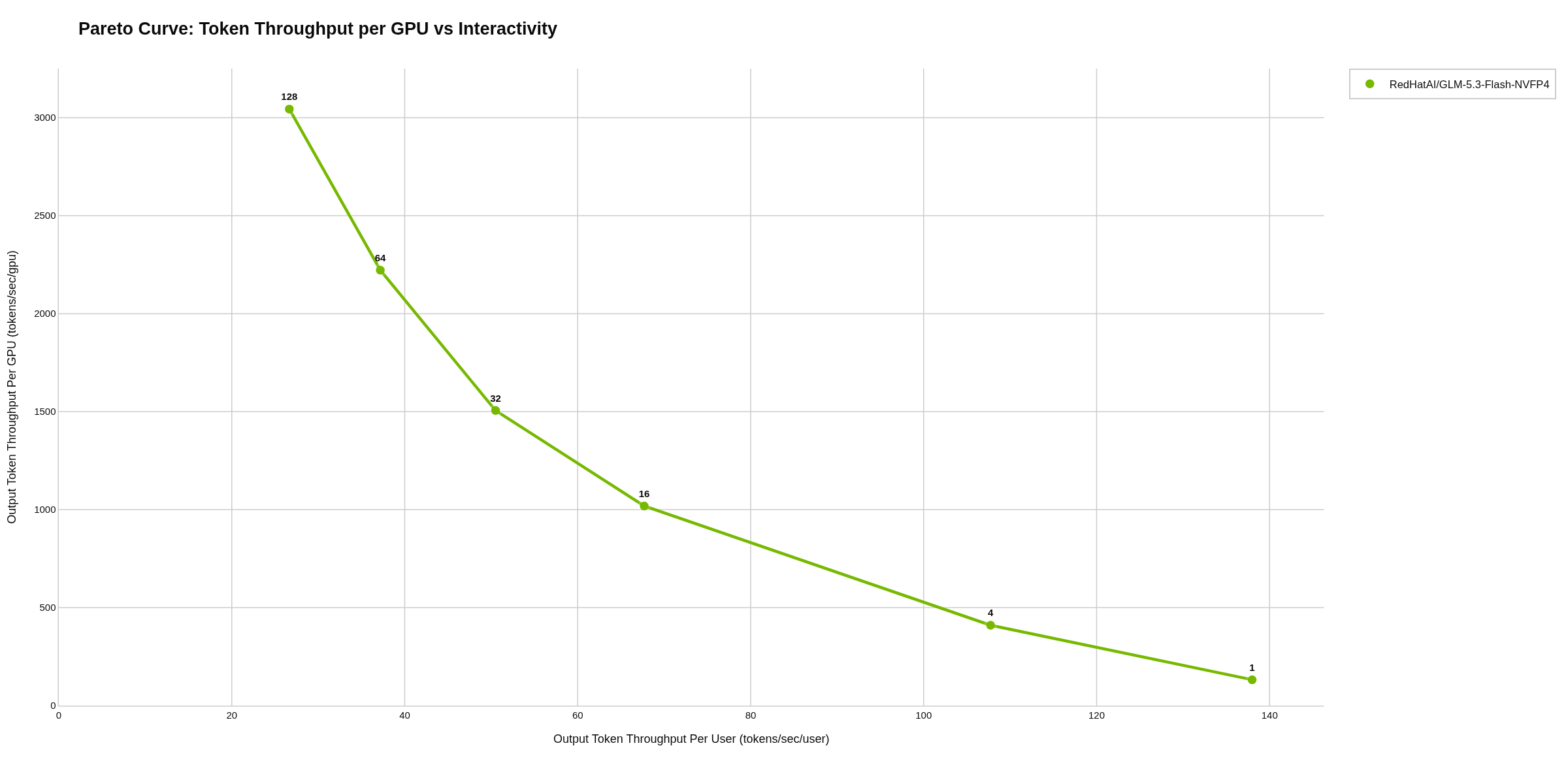
RedHatAI/GLM-5.3-Flash-NVFP4, run 2: up to 128 concurrent requests. Each chart is a Pareto curve: the vertical axis is total tokens per second, the horizontal axis how fast one answer streams, and each point one load level. The axis scales differ between the two charts.
For the other four models, the run 1 chart comes first, then the run 2 chart.
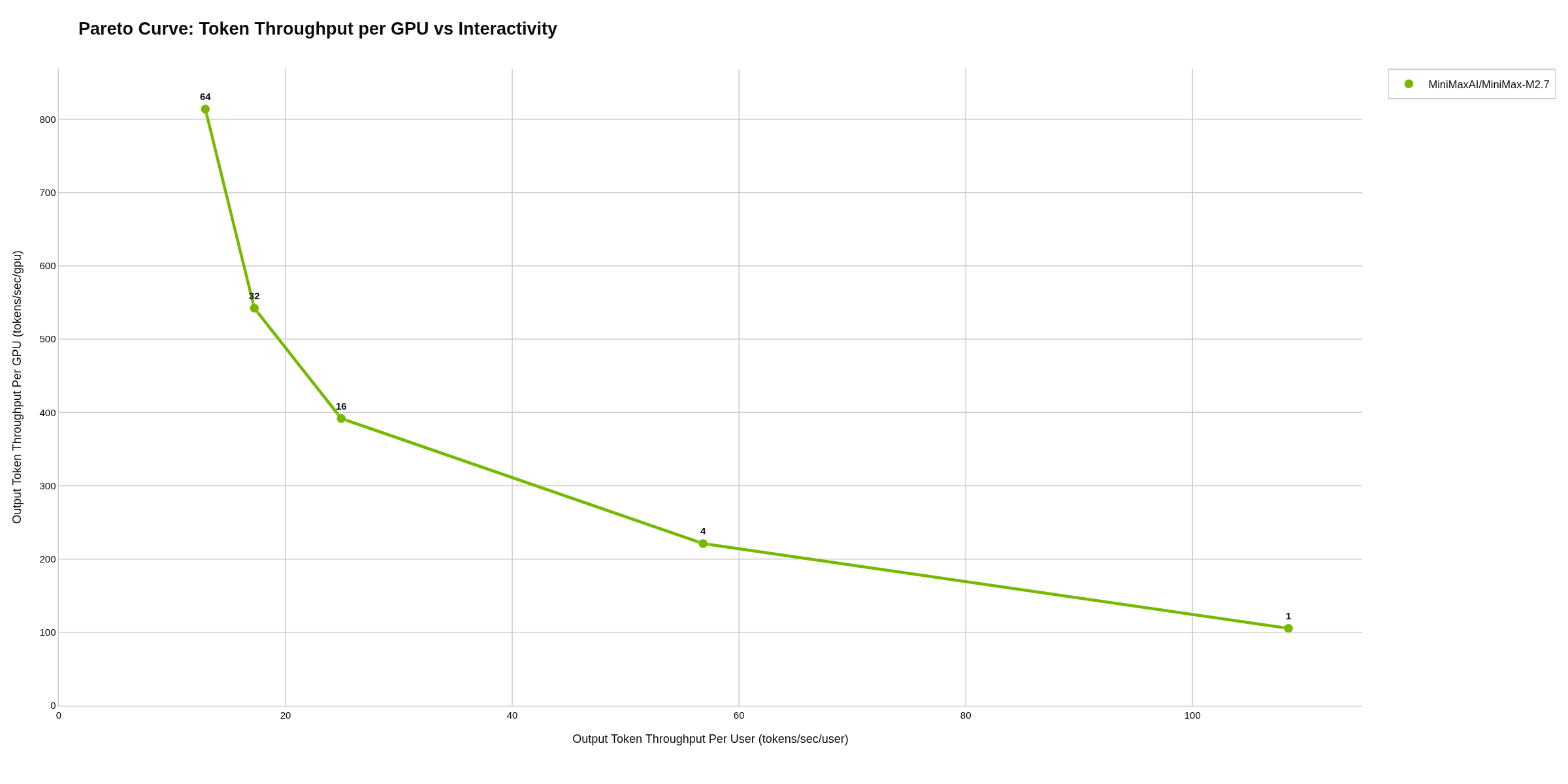
MiniMaxAI/MiniMax-M2.7, run 1: up to 64 concurrent requests.
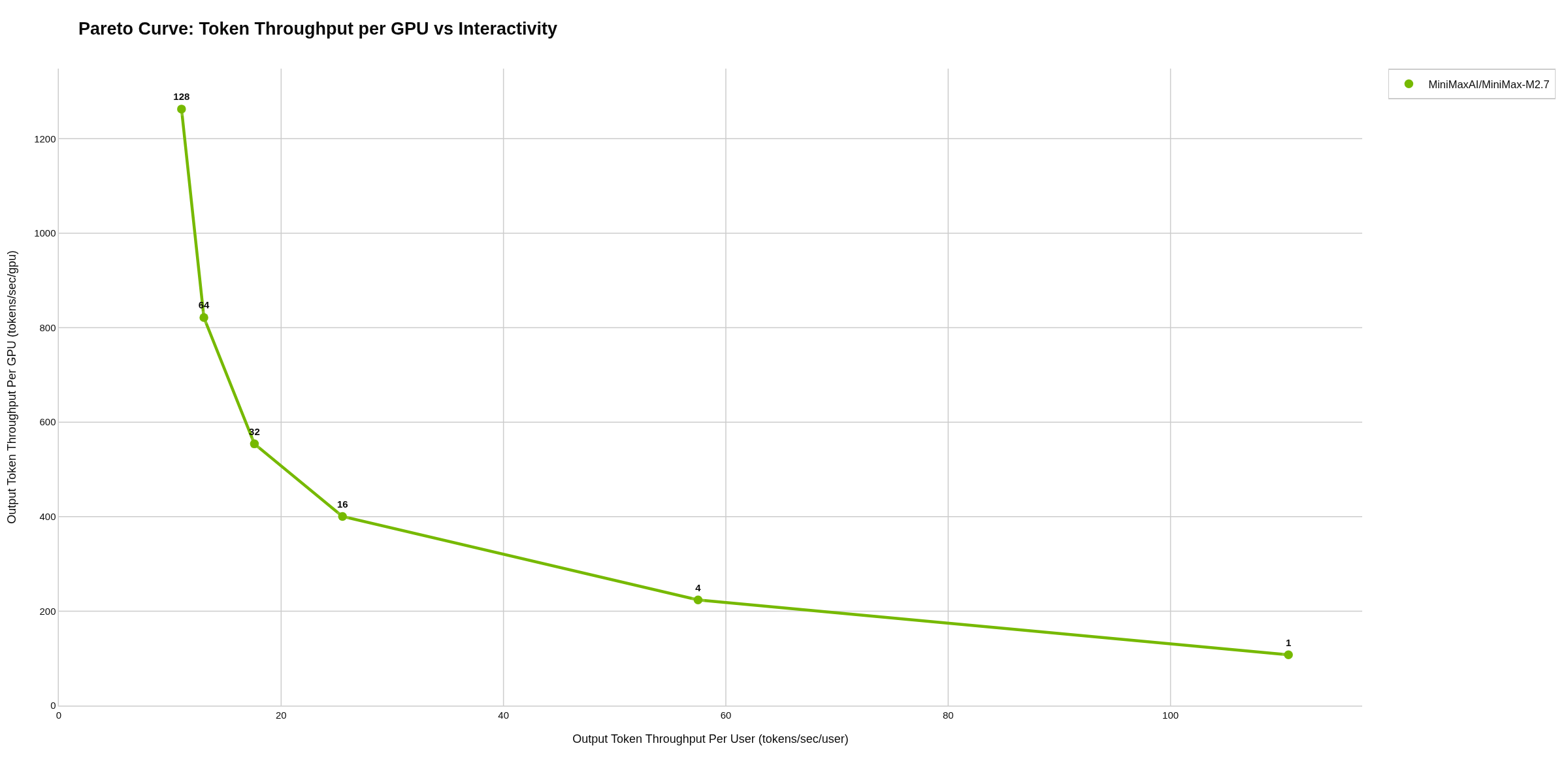
MiniMaxAI/MiniMax-M2.7, run 2: up to 128 concurrent requests.
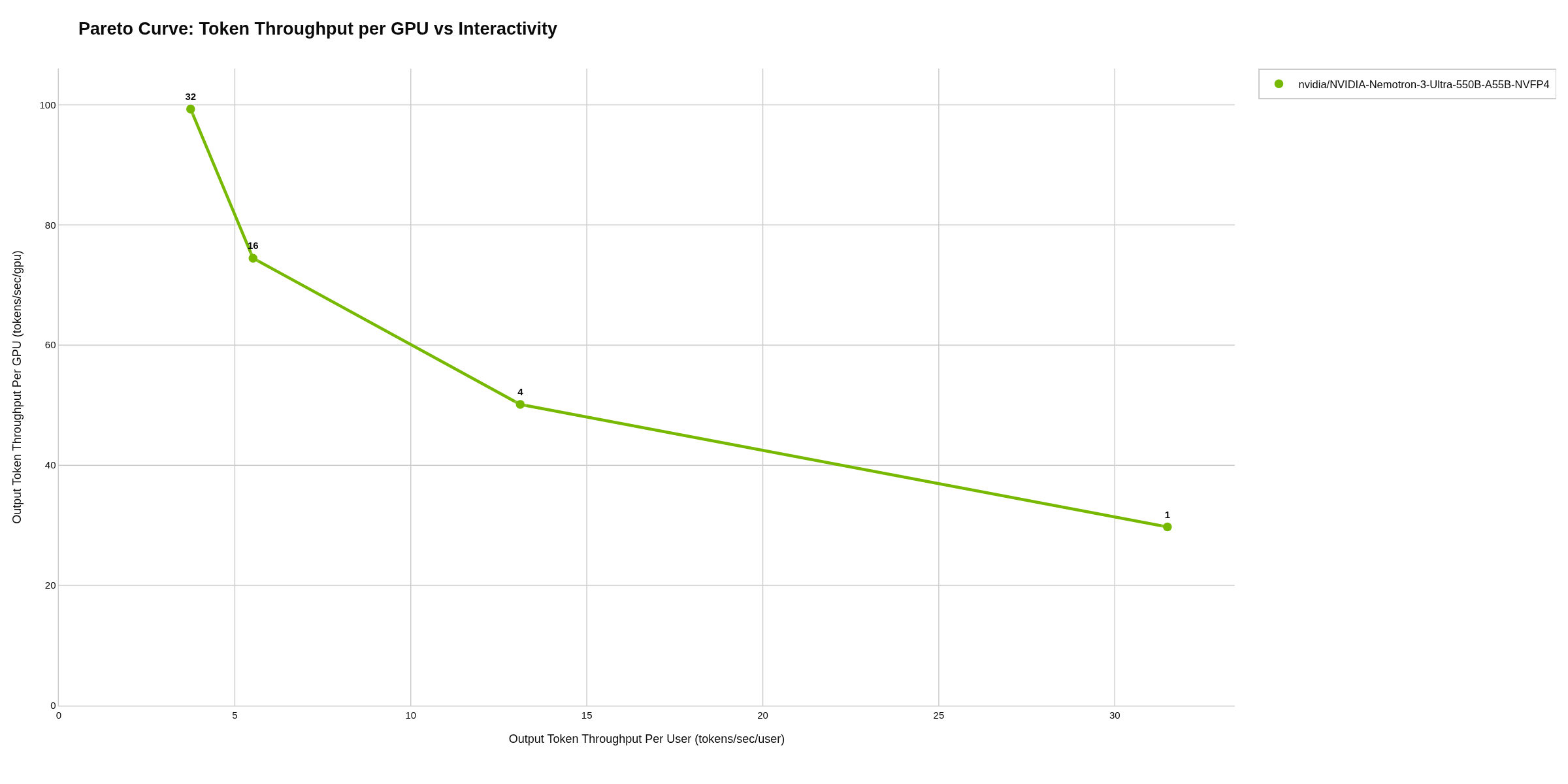
nvidia/NVIDIA-Nemotron-3-Ultra-550B-A55B-NVFP4, run 1: up to 32 concurrent requests.
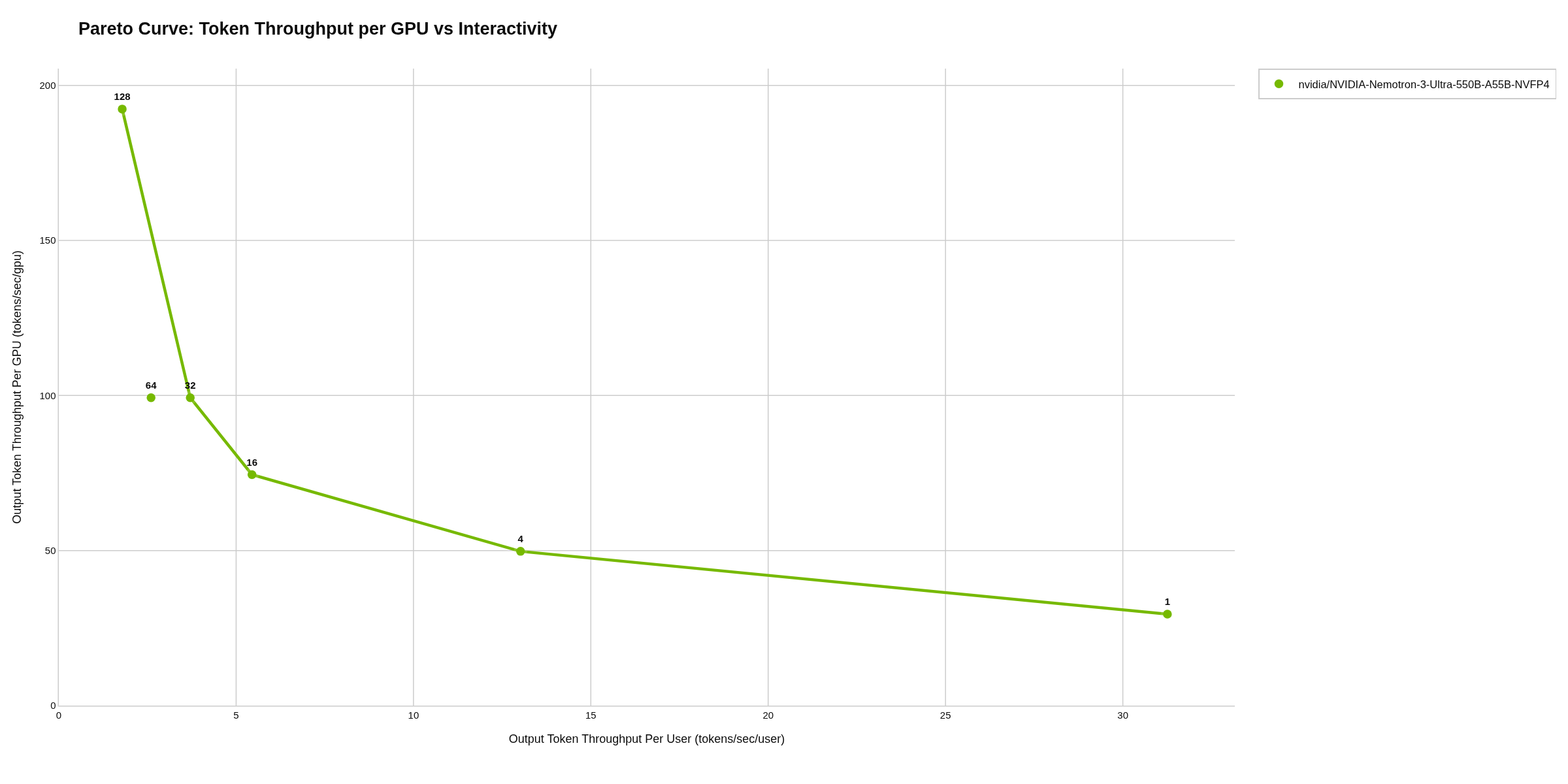
nvidia/NVIDIA-Nemotron-3-Ultra-550B-A55B-NVFP4, run 2: up to 128 concurrent requests.
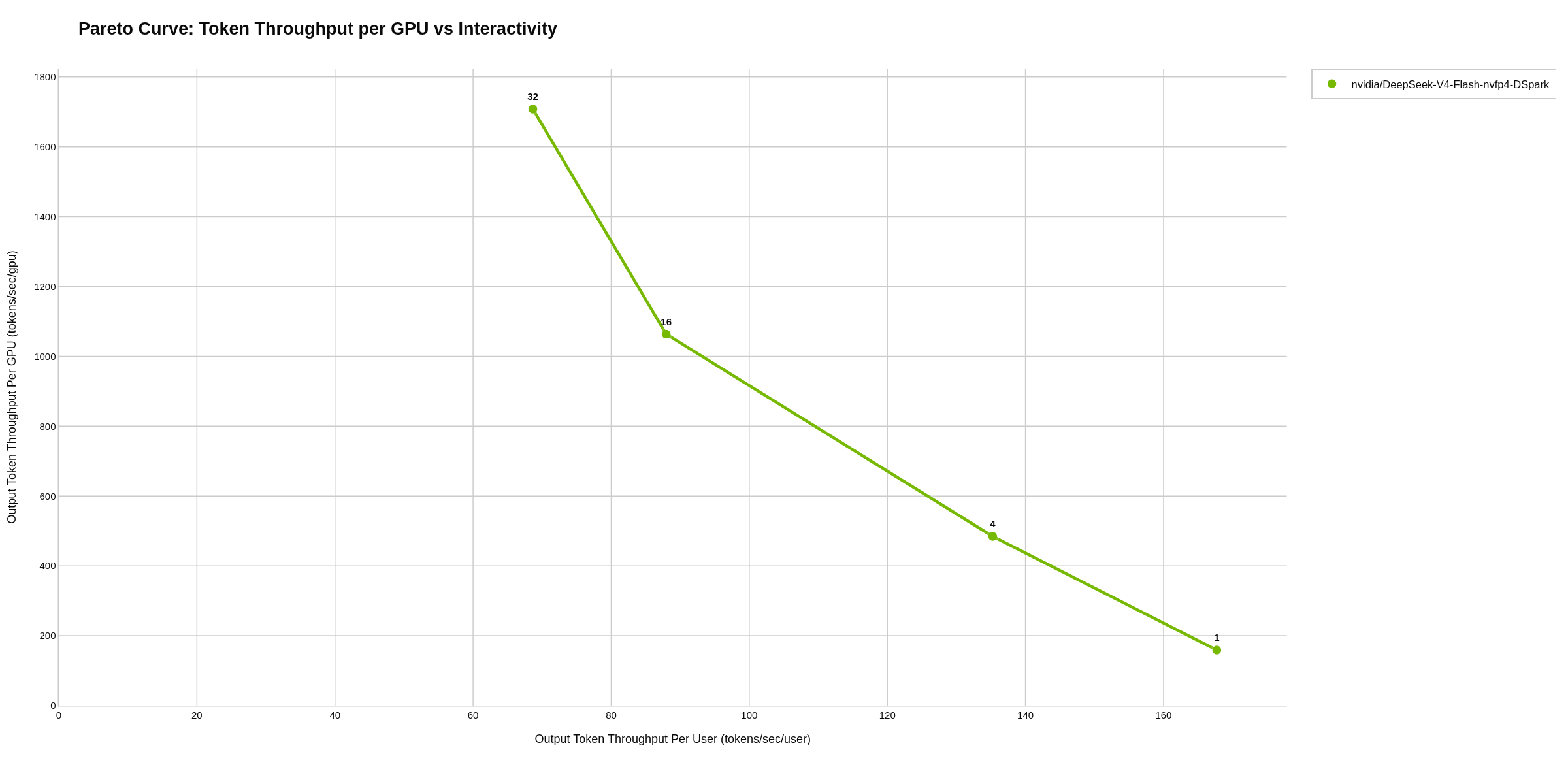
nvidia/DeepSeek-V4-Flash-nvfp4-DSpark, run 1: up to 32 concurrent requests, no CPU offload.
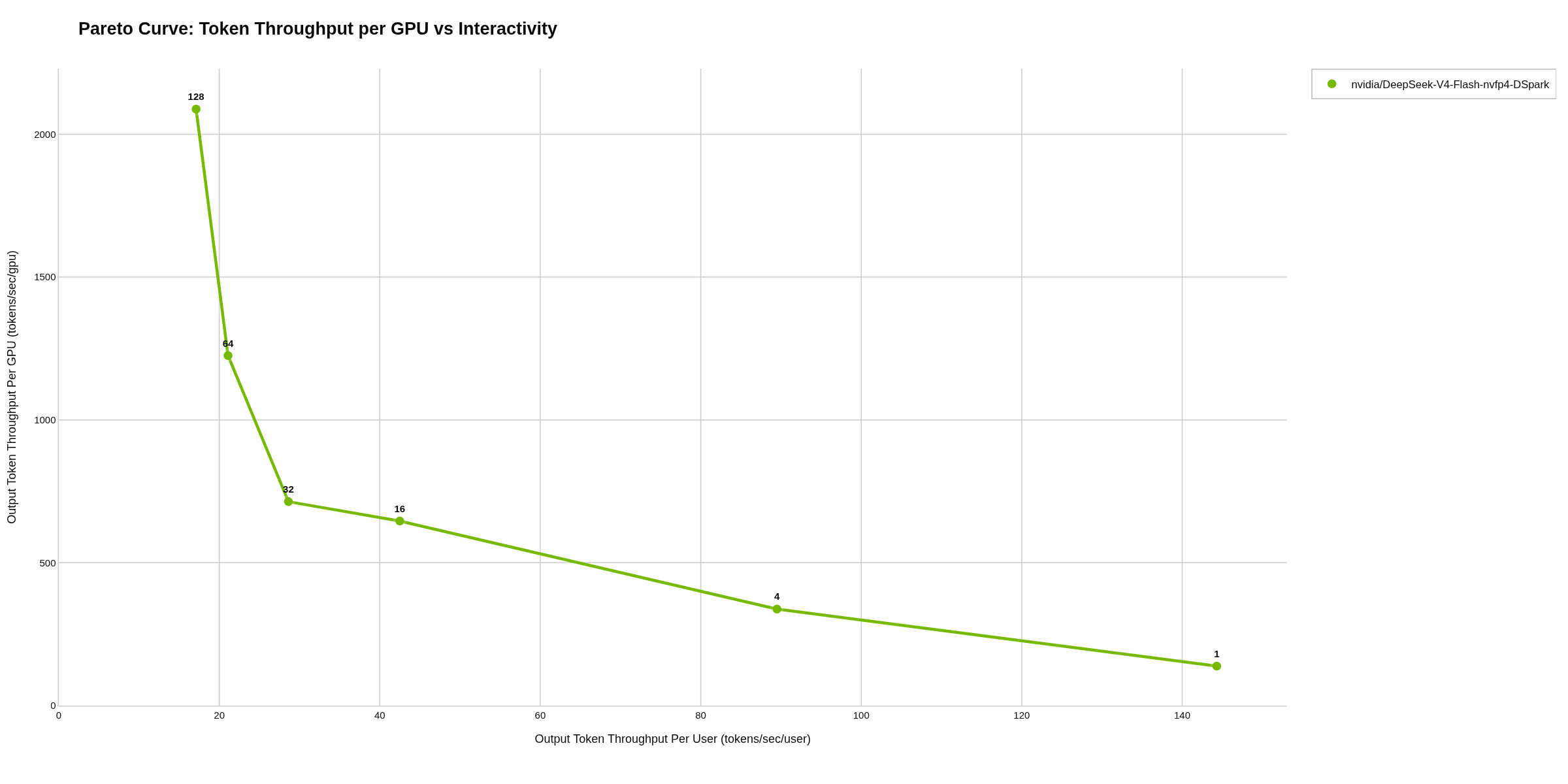
nvidia/DeepSeek-V4-Flash-nvfp4-DSpark, run 2: up to 128 concurrent requests, 15 GB of expert weights in CPU memory.
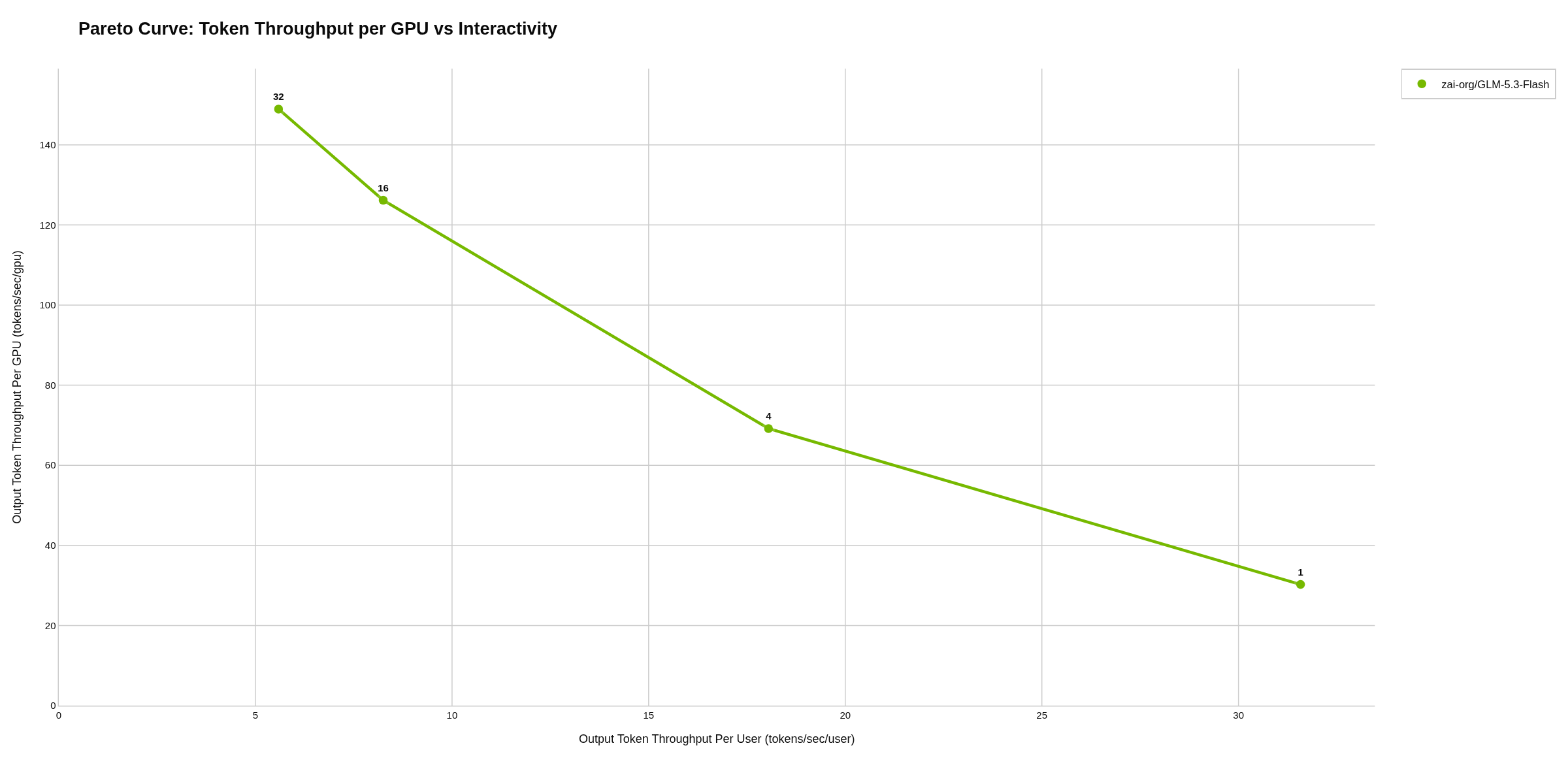
zai-org/GLM-5.3-Flash, run 1: up to 32 concurrent requests, 110 GB in CPU memory.
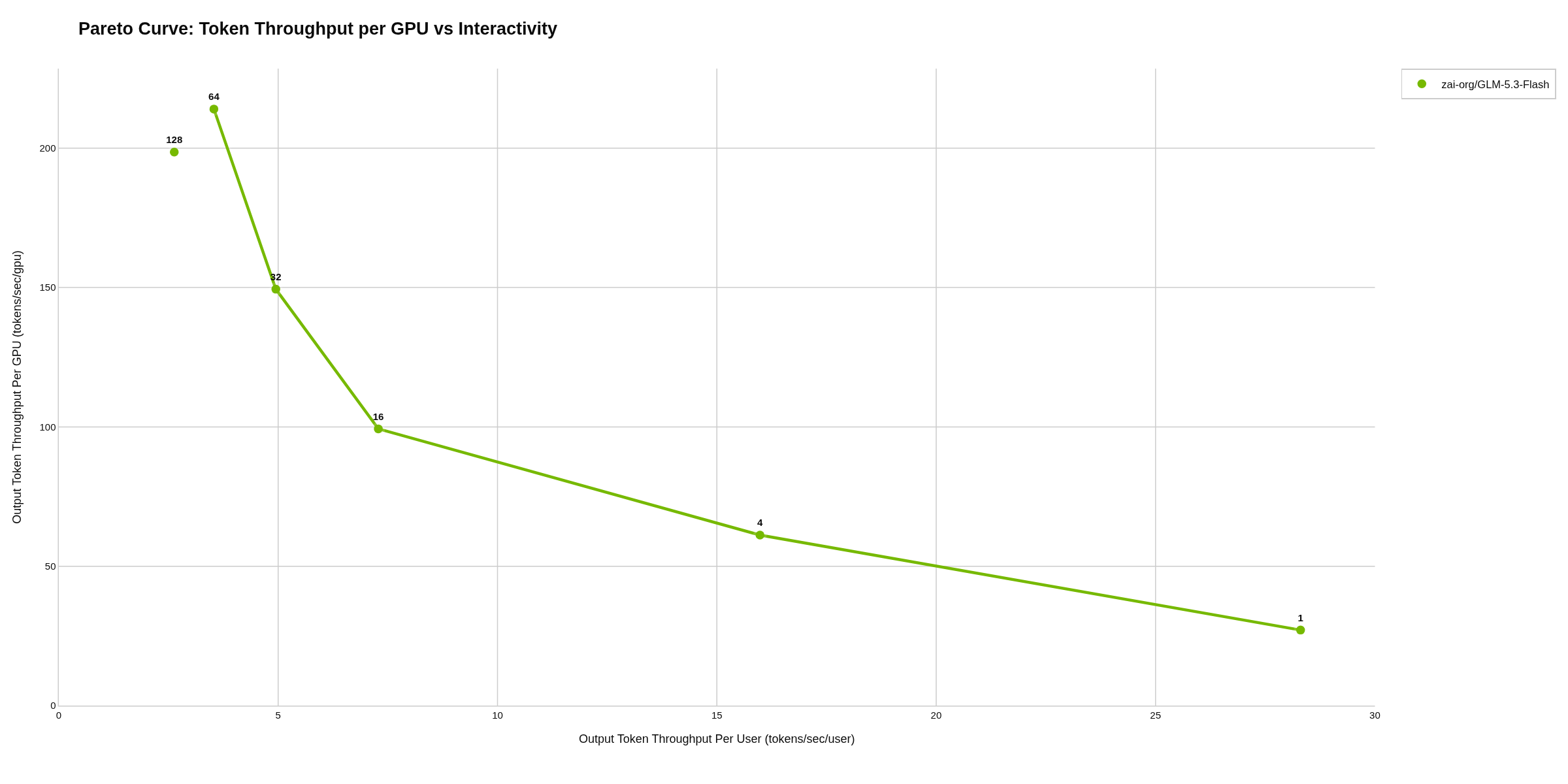
zai-org/GLM-5.3-Flash, run 2: up to 128 concurrent requests, 130 GB in CPU memory.
Across the five models
Where only the request limit changed, the results at the shared load levels reproduced closely, and the higher limit allowed measurements at higher load. The two models whose CPU offloading changed delivered less per request in run 2: zai-org/GLM-5.3-Flash 10 to 12 % less, DeepSeek-V4-Flash 14 to 59 % less; for DeepSeek, tool-call parsing was enabled at the same time.
Limits of this comparison
There are only two configurations. For two models, more than one setting changed at once, so the effect of each setting can’t be separated. Each load level ran twice per run. Both runs used the same vLLM versions per model (v0.29.0, nightly for the GLM-5.3 models, v0.22.0 for Nemotron-3-Ultra), but the nightly build may have differed between the two days; its exact version wasn’t recorded. The workload is synthetic, and real prompts and answers vary in length.
Data
All raw measurements, configuration files and charts are in the two repositories. Each model has its own folder under artifacts/:
| Model | Run 1 (aiperf_dgx_station_260918) | Run 2 (aiperf_dgx_station_260919) |
|---|---|---|
| MiniMaxAI/MiniMax-M2.7 | 20260917_184420_MiniMaxAI_MiniMax-M2.7_c1,4,16,32,64 | 20260919_015212_MiniMaxAI_MiniMax-M2.7_c1,4,16,32,64,128 |
| RedHatAI/GLM-5.3-Flash-NVFP4 | 20260917_203021_RedHatAI_GLM-5.3-Flash-NVFP4_c1,4,16,32 | 20260919_040943_RedHatAI_GLM-5.3-Flash-NVFP4_c1,4,16,32,64,128 |
| nvidia/NVIDIA-Nemotron-3-Ultra-550B-A55B-NVFP4 | 20260917_230218_nvidia_NVIDIA-Nemotron-3-Ultra-550B-A55B-NVFP4_c1,4,16,32 | 20260919_063709_nvidia_NVIDIA-Nemotron-3-Ultra-550B-A55B-NVFP4_c1,4,16,32,64,128 |
| nvidia/DeepSeek-V4-Flash-nvfp4-DSpark | 20260917_194410_nvidia_DeepSeek-V4-Flash-nvfp4-DSpark_c1,4,16,32 | 20260919_030210_nvidia_DeepSeek-V4-Flash-nvfp4-DSpark_c1,4,16,32,64,128 |
| zai-org/GLM-5.3-Flash | 20260917_211657_zai-org_GLM-5.3-Flash_c1,4,16,32 | 20260919_051813_zai-org_GLM-5.3-Flash_c1,4,16,32,64,128 |
If you are planning to run a large model on the DGX Station and want to know how specific settings affect your workload, we would be glad to hear about your requirements. We can benchmark the configurations you are considering and help you assess what the results mean for your use case.
 English
 Deutsch (Sie)