
ASUS ExpertCenter Pro ET900N G3 deep dive
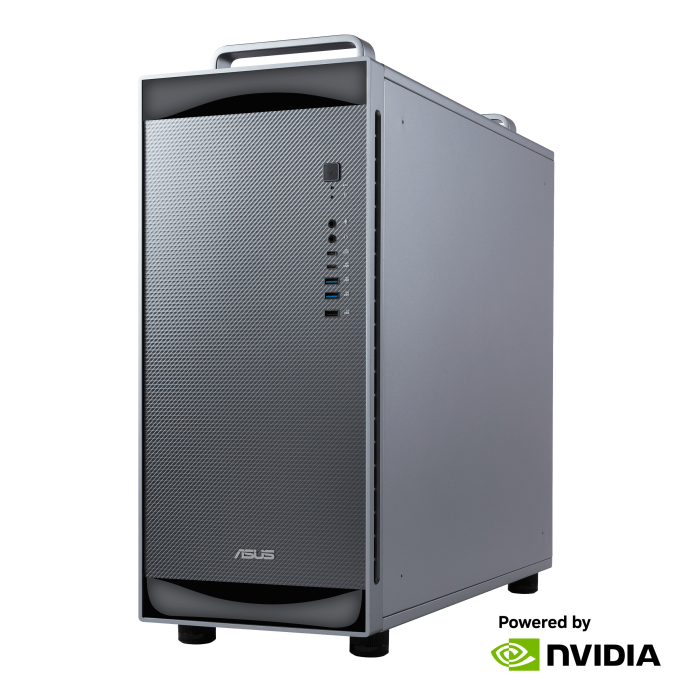
The ASUS ExpertCenter Pro ET900N G3 is a DGX Station GB300 system. It is a state-of the art workstation designed for AI. You can run big LLMs, fine-tune AI models, and use the DGX Station GB300 for other AI and ML tasks. It is designed for workgroups, allowing you to spread the investment across several users, and maximizing utilization.
As every current DGX Station GB300 system the ASUS ExpertCenter Pro is based on a superchip and mainboard design by NVIDIA. The performance of the system is therefore very comparable to other DGX Stations, as they are based on the same design.
There are some differences, however. ASUS is well-known for having very good cooling designs. Their DGX Station is no exception. A good cooling design ensures that you are able to run your ASUS DGX Station without thermal throttling, giving you full performance. It also protects the hardware against aging – ensuring that your DGX Station continues to work for many years.
Technical specification of ASUS ExpertCenter Pro ET900N G3
CPU & GPU
- Processor: 1x NVIDIA Grace ™ 72-core Neoverse V2 CPU (ARM-based)
- GPU: 1x NVIDIA Blackwell Ultra GPU
- MIG: Multi-instance GPU for up to 7 MIGs
- optional: 1x dedicated NVIDIA Blackwell GPU for graphics rendering, e.g. RTX Pro 2000 Blackwell
RAM
- total coherent memory: 748GB, linked via NVLink ®-C2C, at 900 GB/s interconnect bandwidth
- CPU memory: 496GB ECC LPDDR5X, 396 GB/s memory bandwidth
- GPU memory: 252GB ECC HBM3e, 7.1 TB/s memory bandwidth
Networking
- Dual-port QSFP112 400GbE LAN via NVIDIA ConnectX-8 SuperNIC (= 800 Gbit/s bandwidth total)
- 1x RJ45 1GbE Dedicated BMC LAN port
- 1x RJ45 10GbE LAN port
- WIFI optional
Storage
- 4x M.2 PCIe 5.0 x4 NVMe (M-key 2280)
- populated with 2x 2TB SSDs – configurable up to 4x 2 TB or more
Note: ASUS offers two default configurations – 2x2TB and 4x2TB.
PCIe Slots
- 1x PCIe Gen 5 x16 FHFL double-width, for GPUs
- 2x PCIe Gen 5 x8 (in x16) FHHL
- 1x M.2 PCIe 2.0 x1 slot (E-Key 2230))
Front IO Ports and Connectors
- 2x USB 3.2 Gen2 port (Type-C)
- 2x USB 3.2 Gen2 ports (Type-A)
- 1x USB 2.0 port
- 1x headphone port
- 1x microphone port
- 1x power button
- 2x message LEDs
Rear IO Ports and Connectors
- 4x USB 3.2 Gen2 ports (Type-A, 10 Gbit/s)
- 1x microUSB port (for BMC)
- 2x QSFP ports 400 Gbit/s (CX-8 NIC)
- 1x RJ45 port 10 Gbit/s Ethernet (Marvel)
- 1x RJ45 port 1 Gbit/s Ethernet (Realtek)
- 1x mini-DP (video port, for BMC)
- 3x Audio jacks (Audio in/Audio out/Mic)
OS & security
- OS: Ubuntu 24.04 LTS with NVIDIA AI Developer Tools
- pre-installed with essential CUDA-X™ libraries, including tools for data science
- pre-installed with complete NVIDIA AI Software Stack
- out-of-the-box support for NVIDIA NemoClaw open source stack allowing organizations to build and deploy always-on autonomous AI assistants locally
- supports NVIDIA Nemotron
IT manageability and enterprise features
- out-of-band telemetry via BMC
- Redfish API support
- NVIDIA Data Center GPU Manager
- visibility, monitoring, remote management capabilities
- hardware root of trust
- enterprise secure boot
- onsite hardware support (next business day) included
Note: the onsite next business day support is mandatory with ASUS, their DGX Station can’t be purchased without it.
Dimensions, weight, form factor
- Form factor: desktop tower with carrying handle
- height: 565 mm / 22.3 inch
- width: 232 mm / 9.1 inch
- depth: 584 mm / 23 inch
- net weight: 27 kg
- gross weight: 32 kg
System cooling
- cooling system: closed-loop AIO liquid cooling (suitable for office use)
- data-center grade thermal architecture
- long-duration, full-load local AI computing with zero thermal throttling, consistent peak performance, 24/7 reliability for mission-critical workloads
Power supply
- power supply: 1x 1600W Titanium ATX power supply, 100 – 240V
- compatible with C19 power cord
Misc
- Audio: Realtek® ALC4080 Audio Codec
- operating temperature: TBD
- storage temperature: TBD
- operating relative humidity: TBD (non-condensing)
- storage relative humidity: TBD (non-condensing)
- certification: CE, FCC (Class A), BSMI, UL, KCC
packing content:
- 1x ASUS ExpertCenter Pro ET900N G3 AI Supercomputer (NVIDIA DGX Station GB300)
- 1x power cord: IEC C19 to EU standard plug (US NEMA 5-20P available on request)
AI performance
- FP4 Tensor core: 20 PFLOPS / 15 PFLOPS without sparsity
- FP8 / FP6 Tensor core: 10 PFLOPS
- Int8 Tensor Core: 330 TOPS
- FP16/BF16 Tensor Core: 5 PFLOPS
- TF32 Tensor Core: 2.5 PFLOPS
- FP32: 80 TFLOPS
- FP64 / FP64 Tensor Core: 1.3 TFLOPS
Additional Questions and answers for the ASUS ExpertCenter Pro ET900N G3
What is the default RAID configuration? Can it be changed?
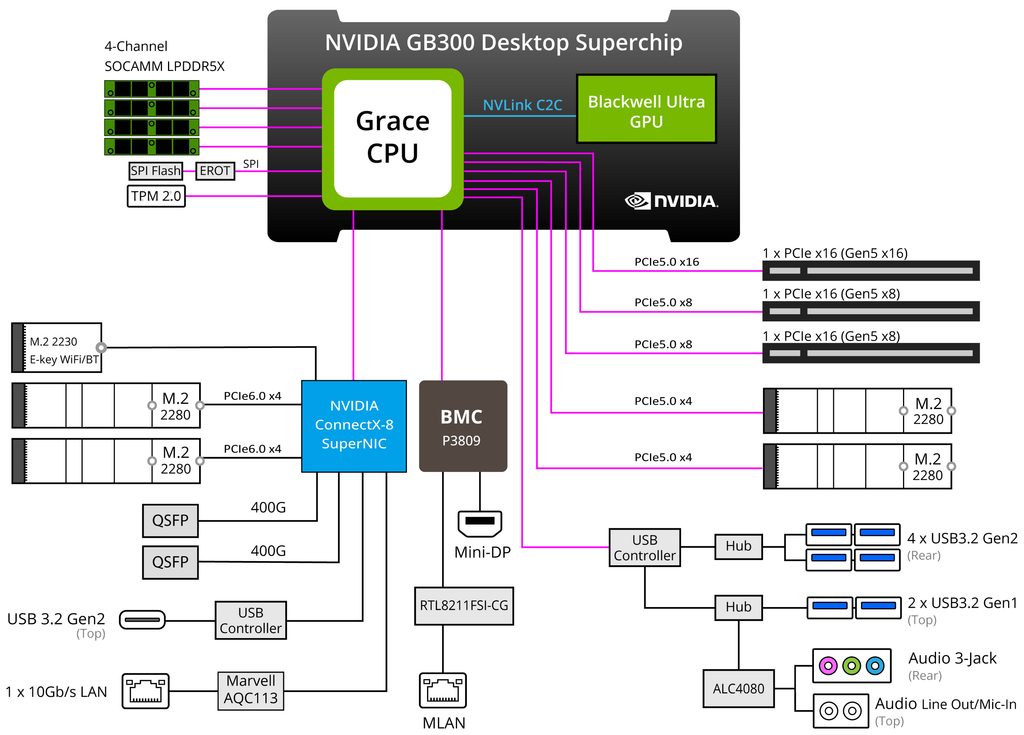
The default configuration is 2*2 TB, pre-configured for OS RAID 1. These are connected directly to the Grace CPU.
They can be used for training, but ideally an additional 2*2 TB SSDs would be better. These are connected to the NVIDIA ConnectX-8 SuperNIC (CX-8) for training.
Here is a helpful block diagram to understand the configuration (for Gigabyte, but similar for the ASUS system):
The RAID 1 can be changed to RAID 0 (striped) in the Linux system.
NVIDIA provides a helpful utility called configure_raid_array.py in their packages nvidia-system-core and nvidia-system-utils for this purpose:
curl -fsSL https://repo.download.nvidia.com/baseos/ubuntu/noble/arm64/dgx-repo-files.tgz | sudo tar xzf -C /

sudo apt update

sudo apt install -y nvidia-system-core nvidia-system-utils
sudo /usr/bin/configure_raid_array.py -c -f
Can additional SSDs be installed? Will they be covered by the ASUS warranty?
ASUS will only cover the parts they sold, but the customer is free to install additional SSDs themselves.
What is the current price and lead time for ASUS DGX Station systems? Can any ASUS DGX Station system be reserved?
We update the lead times, and current prices on our pi3g DGX Station comparison page. Please refer to it.
Generally, ASUS systems are sold on a first come, first-serve base. For the sale to be finalized, and your system reserved for you, we need to finish compliance and commit the order.
ASUS has a hub in Europe, where they get new stock each month.
How does on-site next business day service look like for the ASUS DGX Station? What are the important facts to know about it?
If you place your request before 12:00 (mid-day), you are eligible for the next-business day service.
A team member from the ASUS support team (or their local on-site partner) will reach out to you on the next business day, and discuss the problem, and set up an appointment for repairs.
The repairs are done within 5 business days. The cost for 3 years (on-site next business day) is included – spare parts, onsite work, etc.
TL;DR: On-site next business day means that your DGX Station system should be functional again within 5-6 business days, depending on the appointment. Initial steps towards a problem resolution will be on the next business day, if you register the problem with ASUS until 12:00 pm (mid-day) the day before.
The next-business day refers to the initial response.
Who covers on-site service in Italy for ASUS?
The agency for Italy covering on-site service is Technogroup.
Share more about the TPM 2.0 chip?
It supports TPM 2.0, secure boot and signed firmware.
Which BMC features are included, and do they require additional licenses?
remote KVM, virtual media, LDAP/Active Directory authentication are all included, at no additional license cost.
Is a rack mount option available?
ASUS does not provide a rack mount option for the ExpertCenter Pro. It can, of course, be put on a tray in the data center.
If you need native rack mounting kit options, SuperMicro and HP offer them.
What is the heat dissipation in BTU/h?
The heat dissipation is 5999 BTU/h.
What is the noise level of the ASUS ExpertCenter Pro ET900N G3?
please refer to the table below. At max-load the system reaches 56 dB under the conditions specified below. In the silent mode, and with no QSFP fan activation (for the ConnectX-8 link to another DGX Station, for example), the system idles at 28 dB.
| Mode | VGA | Loading | Temp | Noise | Note |
|---|---|---|---|---|---|
| Silent mode | Idle | 25 °C | 28 dB | Excludes QSFP fan activation (no transceiver installed) | |
| Silent mode | Idle | 25 °C | 32 dB | Includes QSFP fan activation | |
| V | Idle | 25 °C | 35 dB | With VGA; includes QSFP fan activation | |
| Max-load | 25 °C | 48 dB | Includes QSFP fan activation | ||
| V | Max-load | 25 °C | 51 dB | With VGA; includes QSFP fan activation | |
| Auto mode | Idle | 35 °C | 31 dB | Includes QSFP fan activation | |
| V | Idle | 30 °C | 36 dB | With VGA; includes QSFP fan activation | |
| Max-load | 35 °C | 50 dB | Includes QSFP fan activation | ||
| V | Max-load | 30 °C | 56 dB | With VGA; includes QSFP fan activation |
Reference scale, dB(A)
| dB(A) | Example | Effect |
|---|---|---|
| 0 | Threshold of hearing | — |
| 10 | Breathing | — |
| 20 | Rural night, ticking watch | Very quiet |
| 28–32 | Bedroom at night, whisper | WHO night guideline for bedrooms is under 30 dB |
| 40 | Library, refrigerator hum | Quiet |
| 50–56 | Rain, quiet office, conversation | Moderate |
| 60–65 | Restaurant, lively conversation | Starts to tire concentration |
| 70 | Vacuum cleaner, busy road | Loud |
| 75–85 | 1U/2U GPU server under load | You have to raise your voice |
| 85 | Heavy traffic, food blender | Hearing damage risk over 8 hours (NIOSH) |
| 100 | Motorcycle, jackhammer | Damage within about 15 minutes |
| 120 | Thunderclap, rock concert | Threshold of pain begins |
| 140 | Jet engine at 30 m | Immediate damage |
As you can see, the ASUS ExpertCenter Pro ET900N G3 is optimized for office use, thanks to being at a moderate noise level under high load. This is achieved due to a closed loop liquid cooling system.
What is the maximum power consumption, what is the idle power consumption of this ASUS system?
The ASUS system, same as all other DGX Stations, has a maximum power consumption of 1600 W. This will require a specialized 20A power circuit in the USA, while power will be throttled in Japan for normal circuits. In Europe, the system can be powered off a normal 16A power strip.
For idle power consumption, the ExpertCenter Pro ET900N G3 will stay under 160W.
Please refer to the table below for a better understanding of the power budget.
| Use Case Description | Workload condition | HPM Component Power, 1600 W Total |
|---|---|---|
| No PCIe add-in-card GPU | GPU heavy | GPU = 1300 W CPU + SOCAMM = 100 W PCIe Card = 0 W ROS2 = 200 W |
| CPU heavy | GPU = 1126 W CPU + SOCAMM = 274 W PCIe Card = 0 W ROS2 = 200 W |
|
| With 300 W PCIe add-in-card GPU(PRO 6000 Blackwell Max-Q) | GPU heavy | GPU = 950 W CPU + SOCAMM = 100 W PCIe Card = 300 W ROS2 = 200 W |
| CPU heavy | GPU = 776 W CPU + SOCAMM = 274 W PCIe Card = 300 W ROS2 = 200 W |
|
| With 75 W PCIe add-in-card GPU(PRO 4000 Blackwell SFF or PRO 2000 Blackwell) | GPU heavy | GPU = 1225 W CPU + SOCAMM = 100 W PCIe Card = 75 W ROS2 = 200 W |
| CPU heavy | GPU = 1032 W CPU + SOCAMM = 293 W PCIe Card = 75 W ROS2 = 200 W |
Which OS is preinstalled on the ASUS DGX Station?
Ubuntu 24.04 LTS in the DGX OS Version is preinstalled.
Where to buy ASUS ExpertCenter Pro ET900N G3
pi3g offers the ASUS ExpertCenter Pro ET900N G3 and other DGX Station hardware. pi3g is based in Leipzig, Germany, and ships world-wide. Additionally, pi3g offers advanced ML solutions, installation, tooling, and operations support for DGX Station hardware. This way, your investment is augmented by a team supporting the ML and AI workloads you intend to use the machine for.
 English
  Deutsch (Sie)