
NVIDIA DGX Station GB300 FAQs
How fast is the NVIDIA DGX Station GB300?
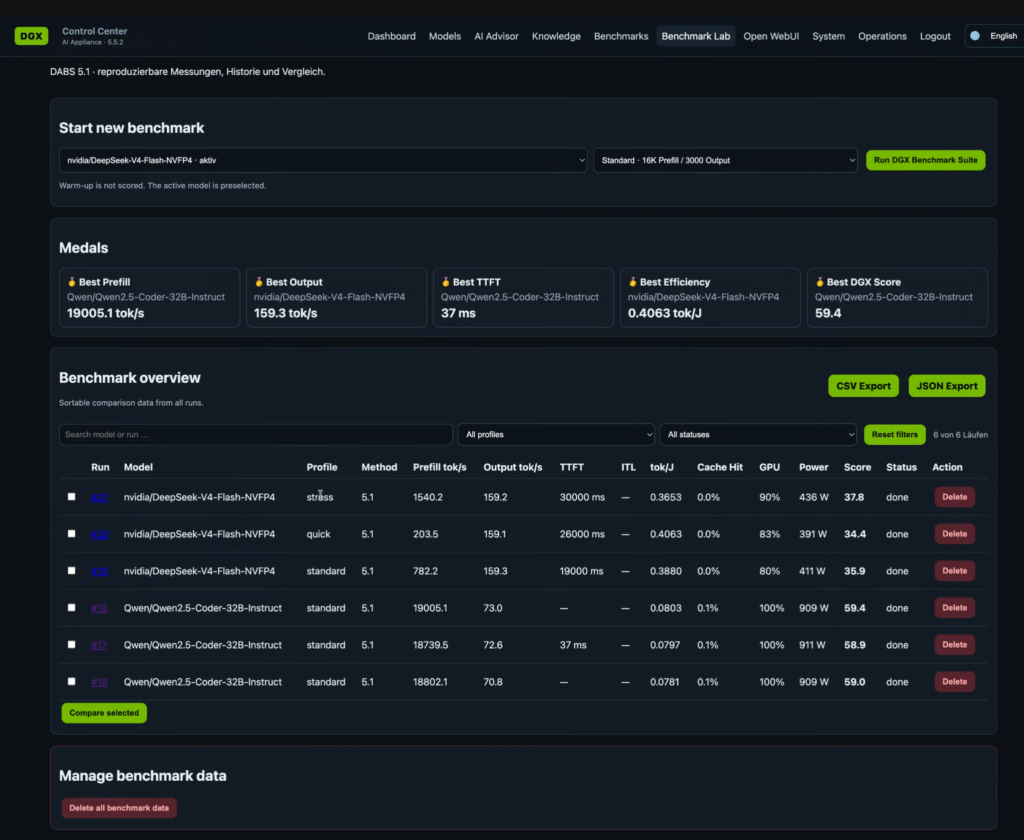
Our first customer for the DGX Station GB300 allowed us to share this screenshot.
It shows the performance of DeepSeek-V4-Flash-NVFP4 and Qwen2.5-Coder-32B-Instruct. These models fit comfortably into the HBM3e VRAM.
DeepSeek-V4-Flash-NVFP4 achieves around 159 output token/s, and Qwen2.5-Coder-32B-Instruct around 70 – 73 output token/s.
Which LLM models run on the DGX Station?
vLLM lists several models in their vLLM recipes:
 NVIDIA-Nemotron-3.5-Lightning-30B-A3B-BF16
 Step-3.7-Flash
 DeepSeek-V4-Flash
 Qwen3.6-27B
- Qwen3.6-35B-A3B
 MiniMax-M2.7
 gemma-4-26B-A4B-it
- NVIDIA-Nemotron-3-Super-120B-A12B-BF16
These range from 284B/13B (MoE) for DeepSeek-V4-Flash, down to 26/4B (MoE) for Gemma 4:
| model name | size | architecture | precision | DGX Station |
| NVIDIA-Nemotron-3.5-Lightning-30B-A3B-BF16 | 30B/3B | MoE | NVFP4 | yes |
| Step 3.7 – Flash | 198B/11B | MoE | BF16 | yes (FP8) |
| DeepSeek-V4-Flash | 284B/13B | MoE | FP8 | yes (FP4) |
| Qwen3.6-27B | 27B | Dense | BF16 | yes |
| Qwen3.6-35B-A3B | 35B/3B | MoE | BF16 | yes |
| MiniMax-M2.7 | 230B/10B | MoE | FP8 | yes (FP8) |
| gemma-4-26B-A4B-it | 26 B/4B | MoE | BF16 | yes |
| NVIDIA-Nemotron-3-Super-120B-A12B-BF16 | 120B/12B | MoE | BF16 | yes |
Note: the context can be put into CPU memory for the DGX Station, due to the unified memory design.
How does the order process for the NVIDIA DGX Station work?
Here is how you can get an NVIDIA DGX Station step by step:
- Decide if the NVIDIA DGX Station is a good fit for you. We, pi3g GmbH & Co. KG, based in Germany, can advise you on that.
- Decide for the OEM of the NVIDIA DGX Station. See our list of NVIDIA DGX Station OEMs and current price estimations and lead times
- Get a first quote from us for the DGX Station model you prefer. We can also quote multiple DGX Station options, so you can compare
- Place the order with pi3g or another DGX Station reseller of your choice
- Fill in compliance documents for NVIDIA
- We will forward these documents to the distributor, who in turn forwards them to NVIDIA
- NVIDIA approves your DGX Station purchase
- We will give you a final, binding quote
- Confirm the quote
- Pay
- Your NVIDIA DGX Station system is shipped to you
Please note: The NVIDIA approval process depends on NVIDIA. Because it is highly complex (export controls and sanctions), this process can last several weeks. You can plan on it lasting 14 to 30 days. Therefore, we advise to get your order in as soon as possible.
What are some important things to know before ordering an NVIDIA DGX Station?
Here are some things you should be aware of before ordering an NVIDIA DGX Station:
- Your purchase will need to be approved by NVIDIA, which can take some time
- Prices are likely to increase, due to the memory crisis
- There might be long lead times after the initial batch of the OEMs is sold
- A Windows version of the DGX Station is planned for Q4 / 2026 – contact us to discuss details
- Up to two DGX Stations can be linked to increase performance
- Please read the list of DGX Station contraints published in this FAQ
- 1 Trillion parameter models will only be able to run in a quantized fashion – we can advise you further
Additionally, we recommend to consider a UPS (uninterruptible power source) solution for your system, if you expect to run long calculations or agentic workloads on the system.
NVIDIA has designed this system with a software stack which can scale up further, into server-grade computers, if desired.
How does the NVIDIA DGX Station compare to the DGX Spark?
We have compiled a blog post about the NVIDIA DGX Station vs DGX Spark performance, price and features.
TL;DR: PFLOPS/$ for PFLOPS/$ they are roughly comparable! The DGX Station GB300 is the better high-end choice for teams, while the NVIDIA DGX Spark GB10 is great for applications and small businesses.
We can help you determine which machine is the right one for you – get in touch with us.
How does the NVIDIA DGX Station performance compare to other LLM inference hardware?
We have published a first comparison of the NVIDIA DGX Station with 4x or 8x RTX Pro 6000 Server Edition, at the request of a customer.
TL;DR: the NVIDIA DGX Station wins hands down against 4x RTX Pro 6000, and has some additional advantages.
If you are in the market for LLM inference hardware, and want to compare, before making a buying decision, reach out to us:
How can I test the NVIDIA DGX Station before buying?
Before buying the NVIDIA DGX Station, you want to ensure that it is a good fit for your application.
We can give you remote access to an NVIDIA DGX Station for free, so you can test it yourself in a virtual lab.
Can the DGX Station run at 100 V for Japan? What about the USA?
The Dell Pro Max With GB300 manual provides the input voltage of the power supply as 90 VAC-264 VAC, this should apply to other DGX Station power supplies, too.
The manual goes on to mention that “For the 1300 W safety label, the normal voltage range is 100 VAC – 240 VAC” and “For the 1600 W safety label, the normal voltage range is 115 VAC-240 VAC”.
This leads to the conclusion that the DGX Station can be powered in Japan, however it will run with some performance constraints. One of these constraints may be no additional extension cards, for example no additional GPU.
The standard office voltage in the USA is 120 V, so the system should be able to operate as it was designed, at 1600 W. NVIDIA recommends to power it on a 20A circuit in the USA (20A/120V) – typically US circuits are 15A/120V for max 1800 W.
In case you want to purchase a DGX Station for Japan, please get in touch with us (pi3g) for further clarification of the topic. We can support you in Japanese, as well.
Which operating system runs on the DGX Station? Can the DGX Station run Windows?
The current NVIDIA DGX Station systems will ship with Ubuntu 24.04 LTS with the NVIDIA AI Developer Tools installed.
NVIDIA introduced a plan for “NVIDIA DGX Station for Windows“, to be released in Q4/2026.
Note: this GB300 based system will also include the Grace CPU with 72 ARM cores, it is not an x86 system. This has an impact on the range of applications you will be able to run on Windows.
The specs of the Windows NVIDIA DGX Station are almost identical to the currently already launched DGX Station. Contact us to discuss details, and pre-register your interest in the NVIDIA DGX Station for Windows.
Can I boost AI performance by adding an additional GPU into the DGX Station?
The NVIDIA DGX Station supports one additional GPU, from a strictly limited list of options.
The GPU is exclusively for adding additional graphics output, e.g. if you want to add more screens.
One screen is supported by the built-in port.
Adding additional GPUs to the NVIDIA DGX Station will not boost it’s AI performance, according to a discussion we’ve had with one DGX Station OEM.
If you want to boost AI performance on the DGX Station, you can consider linking two of them together using the ConnectX-8 interface.
Can I add several GPUs into the DGX Station? Which GPUs are supported by the DGX Station?
No, only one GPU can be added into the DGX Station. The reason is the constrained power supply (1600 W) on the DGX Station, most of which is consumed by the GB300 superchip.
There is a list of pre-approved GPUs. As of early July 2026 the following GPUs are supported by DGX Station computers:
- NVIDIA RTX PRO 6000 Workstation Edition
- RTX PRO 6000 Blackwell Max-Q Workstation Edition
- RTX PRO 4000 Blackwell SFF Edition
- RTX PRO 2000 Blackwell
Note: this list may change, especially because of driver support maturity, and power supply constraints. Please contact us to discuss what GPU options are currently feasible on the DGX station.
These cards are for display output only, accelerating scientific workloads, or raytracing. They are not meant for further AI acceleration. This is due to the power usage.
How many screens can I connect to the NVIDIA DGX Station? Will the built-in BMC Displayport interface mDP5 (BMC) work for actual operating system output, or is it for management only?
In the default state you can attach one screen using the built-in BMC displayport interface (mDP5 (BMC)).
This is the management interface, but it will also allow you access to the actual operating system screen output, according to an OEM representative we spoke with.
If you want to add additional screens, you can install a GPU.
Note: The DELL system (Dell Pro Max With GB300) ships with an additional GPU with four mini DisplayPorts preinstalled in the default configuration. Since DELL is typically very configurable, users who want to run the system headless can discuss with their preferred supplier to omit the additional GPU, if possible.
Which type of SSD drives can I mount into the DGX Station?
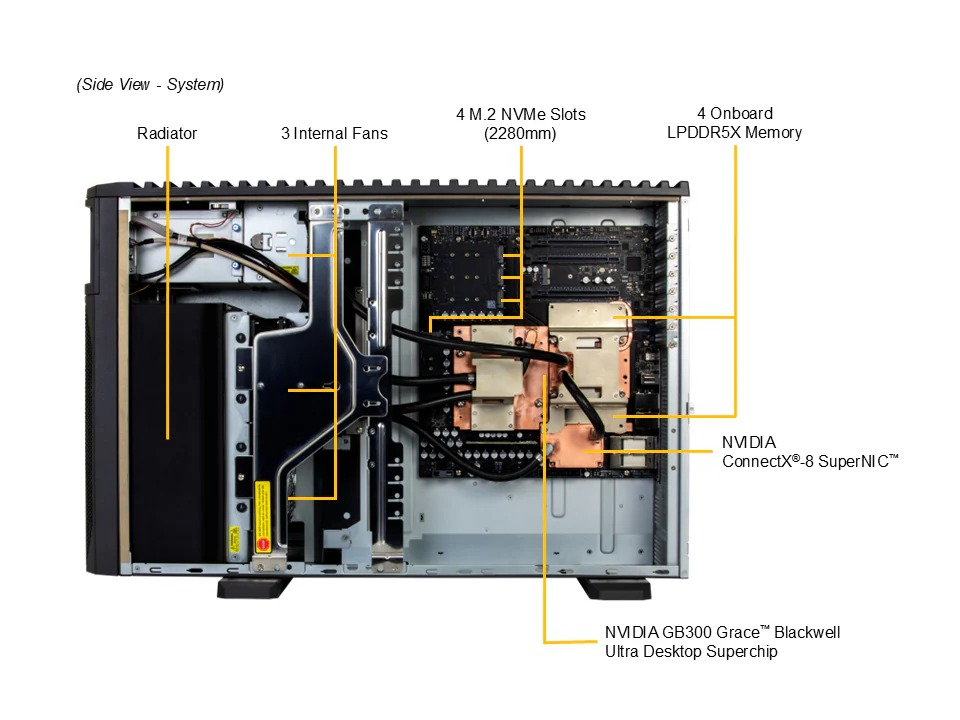
The DGX Station supports 4x M.2 2280 SSD slots.
The default, tested configuration, is 4x 2TB drives.
Notably, some enterprise drives have a 22110 format, which will not fit into the DGX Station.
Which type of switch could I use to interconnect several DGX Stations?
Some customers want to combine three, four or more NVIDIA DGX GB300 Stations.
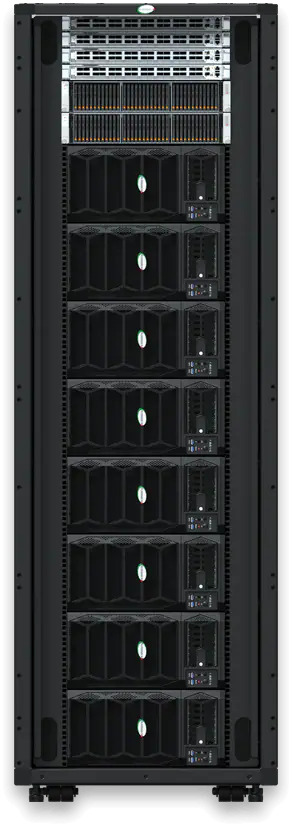
Supermicro has a sample configuration for a 48U rack, including
- 8x ARS-511GD-NB-LCC Super AI Station (Supermicro’s version of the DGX Station GB300)
- 2x SSG-222B-NE3X24R Supermicro Petascale Storage system
- 2x SSE-G3748/R-SONIC L2/L3 1/10/25G Ethernet Switch
- 2x SSE-T7132S Supermicro 400Gb Ethernet Switch – this is the switch used to interconnect the ConnextX(R)-8 SuperNIC (TM) data exchange for the DGX Stations
This rack consumes 18kW of power. Contact us if you are interested in purchasing it. It can be scaled down, or up, depending on your requirements.
Why is HP’s DGX Station called HP ZGX Fury G1n AI Station?
HP uses the Z-moniker for workstations.
G1n: first generation, NVIDIA (n) AI station.
Read more about the pricing of the HP ZGX Fury G1n AI Station compared to other DGX Stations here.
How can I get an NVIDIA DGX Station as early as possible?
In our blog post, “NVIDIA DGX Station available now for purchase” we continue to update availability of different vendors, as per the information we receive.
Get in touch with us to discuss current options, and to secure your place in the queue.
What are some known constraints of the DGX Station?
ARM based CPU
The DGX Station has an ARM-based CPU, which may not be suitable for some workloads. Contact us to discuss your particular workload. Our engineers will advise you, whether the DGX Station is the right choice for you.
An ARM-based version of Windows will run, at least on the DGX Station for Windows version planned for Q4/2026. We expect the hardware to be similar, but possibly some motherboard firmware differences exist.
110 V circuit required for full power
The system needs to be powered at least from a 110 V circuit for full power (see the discussion about Japan further above)
Limited streaming services support on Linux (full support on Windows)
Streaming services like Netflix, Disney+, Apple TV, Amazon Prime Video and others might not play or reduce video to 480p – this is due to missing Widevine DRM support on the Linux ARM64 architecture. The streaming services will work on the NVIDIA DGX Station for Windows.
USB port current limit
There is a power current limit for each USB3.1 Type A port – they are limited to 1A / 5 W per port on the GB300 DGX Station motherboard. If a USB storage device with higher power draw is attached, it causes motherboard current limit protection.
Slow power on after power cycling
Due to the huge amount of RAM the baseboard management controller (BMC) needs more time (about two minutes) for the initialization after re-connecting the device to power. During this time no power LED indicator, video or fan reaction occurs.
Inital vLLM support seems limited to VRAM?
Our first customer reported that vLLM had an out of memory error when trying to load models which would use more than the HBM3e VRAM on the DGX Station GB300.
This might be a configuration issue, or a software issue. The DGX Station is designed with coherent RAM.
The VRAM constraint did not apply to the cache – that could live in the normal CPU RAM.
Why does Lenovo not have a DGX Station system?
Currently, Lenovo is missing from the DGX Station system lineup, which includes other brands such as ASUS.
Also, for the pre-announced DGX Station for Windows system, Lenovo is missing from the lineup.
The reason for this is currently unknown, Lenovo offers a DGX Spark system called ThinkStation PGX. We expect Lenovo to provide a DGX Station system in the future.
I have another question around the DGX Station
Great, submit it to us. We are able to help you with anything around the DGX Station. We are vendor-independent.
 English
  Deutsch (Sie)